

Best Free Audio-Mixing Software in 2026

Try Movavi Video Suite!

  • Convert and playback media files from your DVDs

  • Create complete movies with music and effects

  • Capture any screen activity on your Mac

Edited by
Ben Jacklin
41754

Key takeaways

  • My roundup of the best music-mixing software for a PC contains 10 tools, both online and downloadable programs.
  • Most of my picks are free and surprisingly powerful; some are tricky at first or only work on certain systems.
  • Which audio mixer you grab really comes down to your mood and your project – snipping clips fast, building a full studio track, spinning live mixes, or jamming with friends online.
  • Most audio-mixing software covers the basics: multi-track timelines, plugin support, and reliable performance. Some, though, dive way deeper if you’re willing to explore.
  • Even zero-cost options can punch above their weight, just start with clean recordings and keep your layers tidy.

I spent years watching expensive studio gear through a window before I realized my laptop was already a high-end production suite. I personally stress-tested every program on this list to ensure they don't just look pretty but actually deliver a broadcast-ready mix. It is a wild time for creators because the gap between a bedroom setup and a million-dollar console has practically vanished.

Did you know the early digital mixers had less processing power than a basic modern app for an Android phone? You can now integrate professional effects and layer unlimited tracks on a standard computer without spending a single cent. I found these gems while hunting for an audio mixer for a PC that stays lean but sounds massive.

My top picks

Best for beginners: GarageBand
The clean visual layout makes everything easy to follow. Its huge library of ready-to-use loops helps you build a polished track without diving into complex menus.

Best for precise editing: Audacity
This open-source classic is built for precision. It gives you detailed tools to manually clean waveforms or repair damaged recordings on a PC.

Best for professionals: Cakewalk by BandLab
It runs on a powerful 64-bit engine. The advanced console view mirrors the workflow of high-end recording studios on your computer.

Best for remote collaboration: Soundtrap
I picked this one for its real-time teamwork features. You can invite friends into a live mixing session прямо in your browser, no laptop installation needed.

Best (free) budget software: Waveform Free
It stands out with a modern, fully unlimited DAW setup. There are no track caps and no export restrictions on your computer.

disclaimer_person
To ensure that you receive only verified information, we do the following:
  • When selecting products to include in our reviews, we research both demand and popularity.

  • Movavi Content Team has tested all the products covered in this article.

  • When testing products, we compare all key parameters, including merging video clips, changing video speed, recording voice-overs, creating slideshows, and other significant features.

  • We study user reviews from popular review platforms and make use of this information when writing our product reviews.

  • We collect feedback from our users and analyze their opinions of Movavi software as well as products from other companies.

Comparison table of the best audio mixers for a PC

Program

OS

Main advantages

Read more

Windows, macOS, Linux

Free and open-source, precise waveform editing, multi-track support

macOS, iOS

Beginner-friendly layout, huge loop library, seamless Apple ecosystem integration

Windows, macOS, Linux

Lightweight performance, real-time effect previews, great for large files

Top 10 audio-mixing software

1. Audacity

Why I picked it: I chose this one for its unmatched audio mixer software free status that’s perfect on any budget.
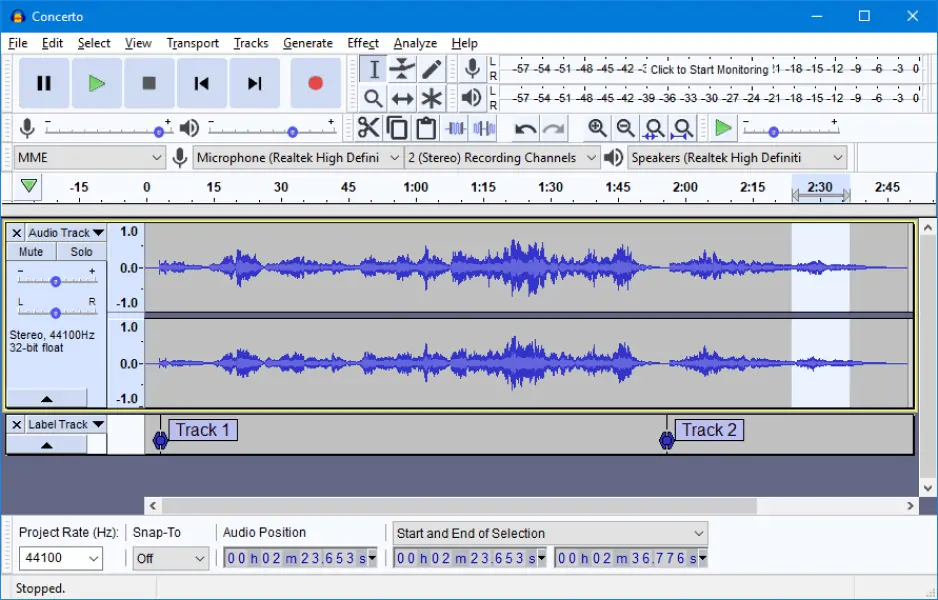
I open my roundup of the best audio mixer software free with Audacity. It is an open‑source program for recording, editing, and mixing audio on your laptop or desktop computer. It comes with multi‑track support and basic effects that you can apply without paying a cent.

Its workflow lets you cut, trim, adjust volume, and combine tracks manually – I found that particularly useful for cleaning up audio before streaming a podcast. Although its interface may not be the most handsome on the market, updates and revamps are pretty frequent. The most recent stable builds have bug fixes and performance tweaks over older versions. For example, version 3.7.7 was posted late in 2025 with broad format support. I like that Audacity runs on Windows, macOS, and Linux, and you can add third‑party plugins to broaden what the core tool can do.

For my own test, I grabbed it on a Monday, plugged in a USB mic, and recorded a voice‑over while trimming out noise and balancing levels for a livestream trailer I was editing. Then I switched to remixing music tracks on my daily‑use laptop to put a simple backing under spoken word segments. By the time I exported the final MP3 to distribute on social platforms, I’d layered dialogue with ambient sound and fixed up hiss using built‑in filters. It proved itself a flexible choice for hands‑on mixing on a PC without forcing me into complicated menus.
Ratings

Pros:
  • Zero cost open‑source tool that covers basic to advanced editing tasks

  • Multi‑track editing and broad format support (WAV, MP3, AIFF)

  • Works across major operating systems (Windows, macOS, Linux)

Cons:
  • Interface feels dated and can be confusing for first‑timers

  • Lacks some advanced real‑time collaboration and modern UI polish

2. GarageBand

Why I picked it: this sleek studio-in-a-box indeed proves one thing: professional production doesn't need to be intimidating or expensive.

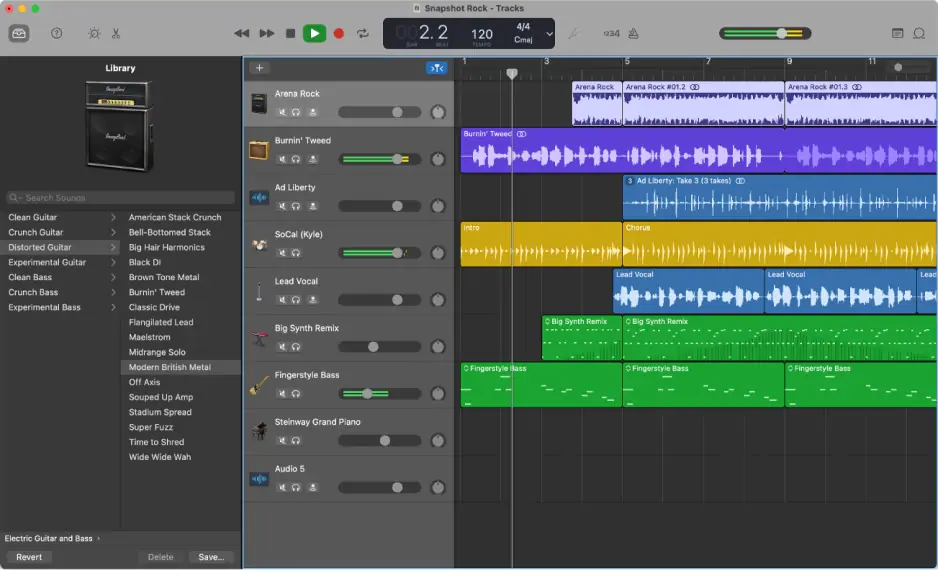
GarageBand redefined the audio mixer software free landscape by pre-installing a full suite of virtual instruments and loops on every Apple device. This program lets you build complex layers by simply dragging and dropping sounds onto a timeline that looks as good as it sounds.

I love sound-mixing software with devoted and caring teams, and GarageBand definitely has one! The latest 10.4.11 update specifically optimized the engine for M-series chips to keep your laptop running cool during heavy sessions. You can integrate your mobile ideas instantly because projects sync across your hardware via iCloud. It remains a legendary tool for sketching out radio-ready demos without touching a single manual.

I fired GarageBand up some weekends ago to record a quick acoustic cover for my social media feed. I used the "Automatic Drummer" to follow my tempo changes – it felt like having a real percussionist in the room. The vocal presets helped me find the perfect plate reverb in seconds, and the final bounce was clean enough to share immediately.

Ratings

4.5/5

4.3/5

Pros:
  • Access to a massive, royalty-free sound library and world-class virtual instruments

  • Seamless migration to Logic Pro if you decide to go pro later

  • Incredibly visual and clean interface that eliminates the learning curve

Cons:
  • The hardware wall is real, as it won't run on any Windows-based PC

  • Advanced users may find the lack of a dedicated mixing console view frustrating

3. Ocenaudio

Why I picked it: I’m a fan of this one because it stays incredibly nimble while processing massive files without breaking a sweat.

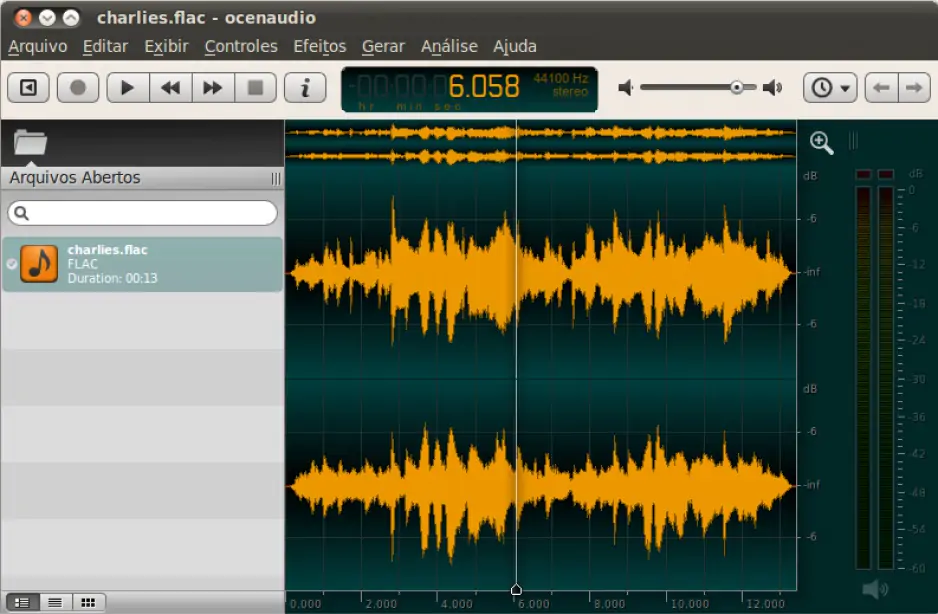
The interface looks a bit bland at first sight and isn't ultra-attractive, but I decided to include Ocenaudio because this app earned its spot as the best audio mixer for PC by keeping things lean. This program shines on any PC by offering a clean, one-window interface that focuses purely on the waveform.

I tracked their latest 3.17.1 stable release which finally fixed a long-standing freeze during startup and added a handy silence selection tool. You can integrate your favorite effects and hear changes in real-time – a feature usually reserved for expensive gear. It runs flawlessly on a standard laptop, and this is precisely why it is my go-to for quick edits on the move. This tool is perfect for cleaning up a long streaming session or a voiceover project.

I used this kit last month to edit a three-hour raw recording of an ambient forest soundscape. Most editors would have chugged or crashed, but I managed to highlight and EQ specific bird calls without any lag. The multi-selection tool let me apply a fade-out to ten different sections simultaneously, saving me a mountain of tedious clicks.

Ratings

Pros:
  • Excellent memory management that allows for editing huge files without slowing down your hardware

  • Real-time effect previews let you hear exactly what you’re changing before you commit

  • Spectral view provides a deep look at frequencies to help spot hidden noise

Cons:
  • It lacks a traditional multitrack view, so you can't easily layer dozens of different songs

  • No mobile version exists, so you won't find it as an Android solution

  • The dull and uninspired visual design lacks the modern flair found in newer competitors

4. Cakewalk by BandLab

Why I picked it: this award-winning digital audio workstation used to be a luxury I could only admire from afar, but now it brings elite studio features to my own desk.

My journey into high-end production continues with a heavyweight that recently shed its massive price tag to become accessible for every home studio. Cakewalk genuinely fits the definition of a top-tier music-mixing software choice. It offers a professional 64-bit engine that ensures your tracks stay crystal clear during heavy processing. This program features a dedicated ProChannel on every track, allowing you to integrate analog-style compression and EQ without taxing your computer resources.

In recent updates, I noticed the latest Sonar evolution specifically polished the UI with high-DPI support and introduced a task-based workflow for faster edits. It provides an unlimited track count, making it a superior audio mixer for PC compared to stripped-down entry-level versions. You can organize complex bus routings on your laptop to create massive, radio-ready wall-of-sound textures.

I probed this audio mixer for PC last summer to mix a multi-mic drum session for a local indie band. By using the built-in Console Emulator, I added a gritty vintage warmth that made the digital recording feel like it was captured on tape. The final export sat perfectly in the stereo field with zero phase issues.

Ratings

3.8/5

Pros:
  • Professional-grade mix engine and console view provide a high-end studio feel

  • Includes a vast array of high-quality virtual instruments and MIDI tools

  • The ProChannel modules offer a cohesive and powerful way to shape your sound

Cons:
  • The interface is rather dense and can feel overwhelming for a casual hobbyist

  • It is strictly a Windows-only affair, so you won't find it as an Android solution

  • Requires a persistent BandLab account to keep the license active

5. Soundtrap

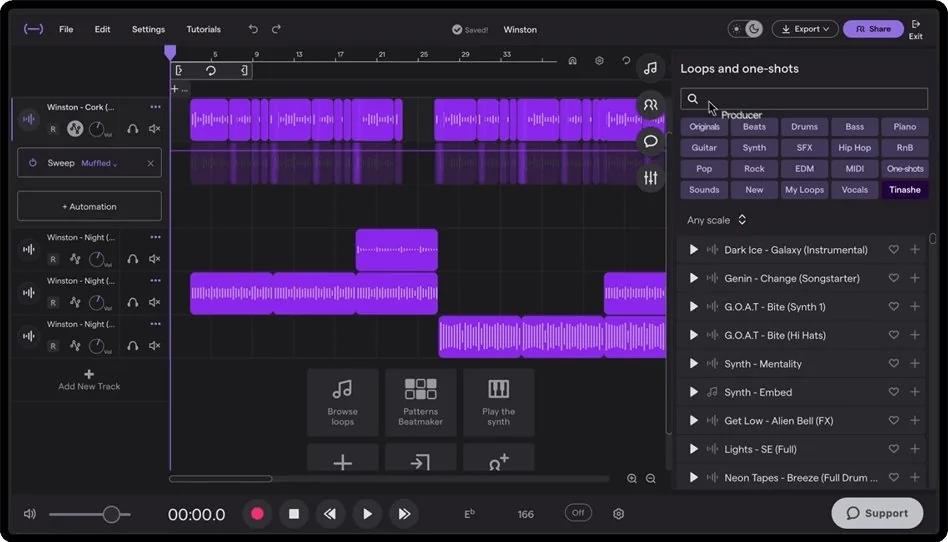
Why I picked it: I’m obsessed with this one because it turns any web browser into a professional recording studio where my friends can jump into a session from across the globe.

We hit the midpoint of my ranking with a cloud-powered standout that completely changes how we collaborate on tracks without installing heavy files.

Soundtrap is a groundbreaking audio mixer app that runs entirely online. You can produce music without being tied down to a single desk! This tool is graced with a massive collection of loops and high-quality software instruments that work smoothly on any laptop or mobile device. I checked their blog and was surprised by how diligently they roll out new perks and elements.

You can integrate your projects across your hardware since it also functions perfectly as an Android or iOS solution. The platform includes a unique "Auto-Tune" feature powered by Antares, ensuring your vocals always sound polished on your computer. It serves as an excellent music-mixing software for podcasters who need to record interviews remotely with built-in transcription services.

I checked it at the beginning of February 2026 to collaborate on a lo-fi beat with a guitarist living in another city. We both hovered over the same timeline in real-time, tweaking the drum patterns and adjusting the reverb levels while chatting through the internal window. It felt incredibly fluid to see his edits pop up instantly on my screen, and we finished a radio-ready mix in just one evening.

Ratings

Pros:
  • You and your team can edit the same song at the same time from different places

  • No setup needed because you just open your web browser and start creating

  • Professional tools included for free will automatically make your vocals sound perfectly in tune

Cons:
  • If your Wi-Fi is slow – the program will lag or glitch while you work

  • The free version only lets you keep a few projects before asking for a subscription

  • Once you become a pro, you may find the mixing buttons too simple for complex tracks

6. Mixxx

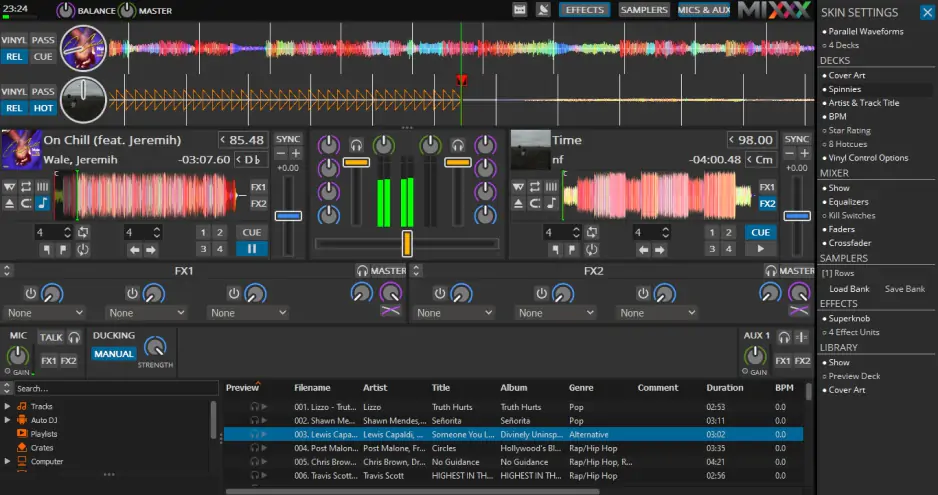
Why I picked it: I am a huge fan of this one because it is the only world-class DJ suite that is completely open-source and free for everyone.

I am pushing forward with a community-driven powerhouse that turns any computer into a professional DJ booth. Mixxx is defined as a vital audio mixer software free of licensing restrictions that supports creative live performances. This program allows you to integrate your entire digital library and sync tracks by tempo with a single click on your laptop.

I dug into the latest 2.5.4 release notes and found they improved library performance and updated mappings for hardware like the Pioneer DJ CDJ. It’s pretty fair to say that Mixxx functions as a top-tier audio mixer for PC by providing four decks, master sync, and a dedicated looping section. You can even broadcast your sets directly to a streaming server without needing extra plugins on your computer.

My first encounter with this kit happened at a backyard party when the professional gear failed. I plugged my laptop into the speakers. The "Auto DJ" feature kept the music flowing. I manually beat-matched every transition into the next track. The built-in equalizer allowed me to kill the bass. The crowd stayed on their feet because the software never skipped a beat.

Ratings

Pros:
  • Totally free and open-source with no hidden subscriptions

  • Supports a massive range of hardware controllers and timecode vinyl

  • Built-in recording and shoutcast tools for digital radio hosting

Cons:
  • The interface can look a bit cluttered and intimidating for someone who has never seen a DJ mixer

  • Lacks some of the flashy AI stem separation features found in paid rivals

  • No version exists for mobile devices like an Android tablet

7. Reaper

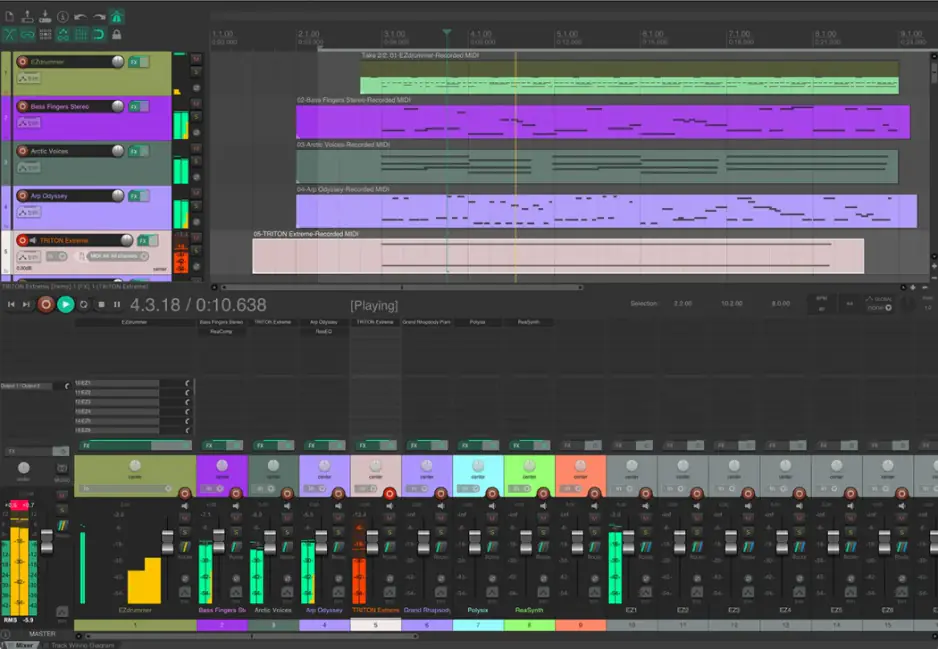
Why I picked it: this lean engine provides professional-grade studio power without the bloat that usually slows down a creative session.

My list of recommendations continues with a powerhouse that stays alive and kicking, always ready to surprise any hobbyist with its relentless efficiency. Reaper is a top-tier music-mixing software that runs flawlessly on any laptop regardless of its age. This program lets you integrate thousands of third-party plugins to shape your sound exactly how you hear it in your head.

Speaking about the latest news, Reaper has quite recently introduced 7.61 update. It refined the dither configuration for secondary render formats and added new horizontal zoom modes for a better visual center. It functions as a highly stable audio mixer for PC that handles hundreds of tracks on a standard computer without crashing. You can customize every single menu and button to build a workspace that fits your specific workflow.

I used this setup to rescue a messy multi-track recording of a live wedding band. By grouping all the vocal tracks together, I balanced the harmonies with just one fader. The final output sounded like a studio record because the processing remained transparent and sharp.

Ratings

Pros:
  • Incredible performance that won't lag even on a budget computer

  • Budget-friendly licensing that offers a full-featured trial period without restrictions

  • Total interface customization allows you to make the app look like any other studio gear

Cons:
  • The lack of built-in virtual instruments means you need to find your own sounds elsewhere

  • A steep learning curve exists because of the sheer amount of hidden menus and right-click options

  • No dedicated version for Android or mobile devices is available for on-the-go editing

8. Waveform Free

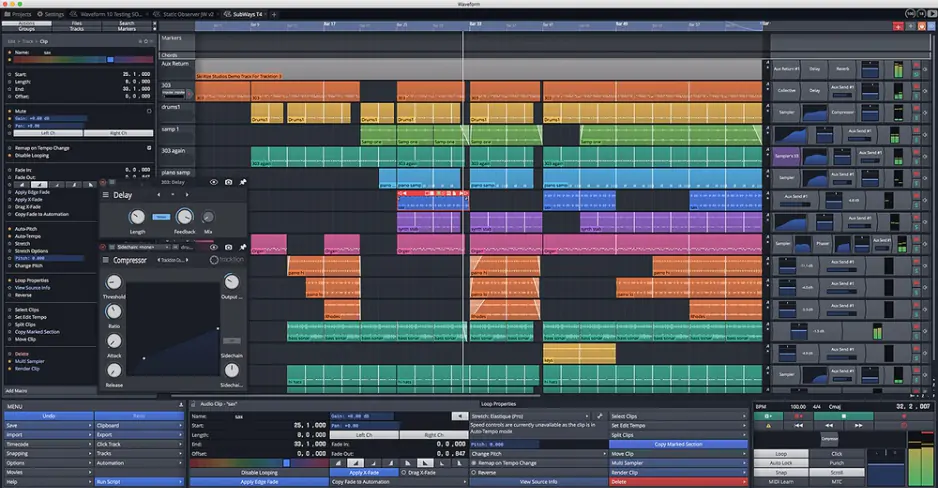
Why I picked it: zero limits, zero price, and still a serious studio vibe.

Waveform Free is bold music-mixing software and a rare audio mixer software free option. I say so because it comes with unlimited tracks, full VST support, MIDI sequencing, and advanced routing inside one cross-platform program for your PC or laptop.

Waveform’s new update 13.5 boosts speed and stability, with Pro-level optimizations that cut load times and run large projects more efficiently. All of it comes at no cost. The team is really showing steady development rather than a frozen freebie!
How was my time with Waveform?

Last week I installed it on my home computer. I recorded live guitar through my audio interface. Then I layered software synths on top. I shaped the mix with bus compression and exported a WAV for streaming platforms.

What impressed me most was simple. No track limits. No export restrictions. Just a real DAW that let me build a full arrangement on my laptop without paying upfront.

Ratings

Pros:
  • Unlimited tracks and advanced routing in the free version

  • Cross-platform support and deep VST integration

Cons:
  • Interface can really feel dense for first-time users

  • Fewer bundled instruments than paid editions

9. Audiotool

Why I picked it: this digital playground lets you wire up virtual cables just like a real studio rack without spending a cent on hardware.

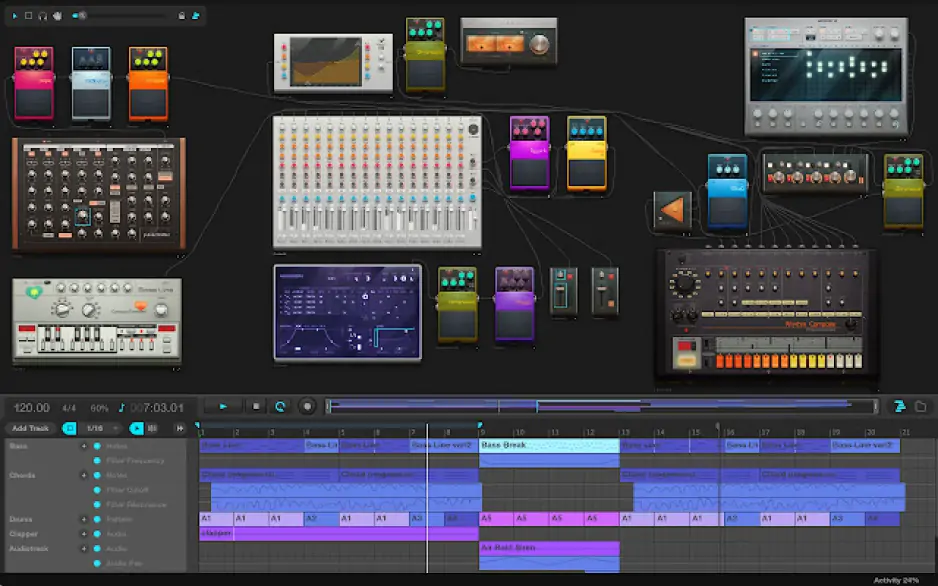
I now pivot to a cloud-based sandbox that lives entirely within your web browser. Audiotool functions as a fully modular sound-mixing software that operates through your internet browser on any computer. You drag classic drum machines and vintage synthesizers onto a workspace to build your signal path manually.

The program recently introduced the Heisenberg synthesizer and expanded its library to more than 250,000 royalty-free sounds. You can drag your own recordings straight into the timeline from your desktop. Processing runs in the cloud, so your laptop does not overheat when you stack effects. It also lets you open other users’ projects and study how they balanced their levels.

I logged into this site to try a quick electronic sketch while sitting at a coffee shop. I connected a virtual delay pedal to a bass synth and synced it with a classic beat machine. The interface allowed me to tweak the knobs in real time while the track looped. I shared the draft with a friend instantly through their internal link system.

Ratings

Pros:
  • Zero cost for a massive library of community-created samples and presets

  • The modular workflow teaches you exactly how audio signals move through hardware

  • No installation required on your PC because everything runs in the browser

Cons:
  • You lose access to your projects if your internet connection drops out.

  • The deep complexity of the cable routing can confuse beginners very quickly

  • You cannot use standard third-party VST plugins within the browser environment

10. LMMS

Why I picked it: this community-driven toolkit works well as a starting point. It suits anyone who wants to arrange melodies without paying for a license.

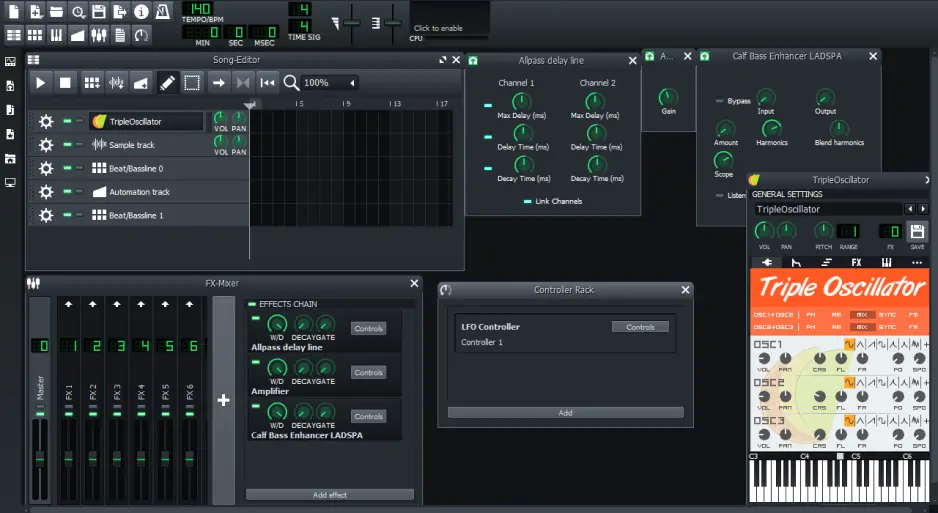
I close my list with an open-source project, LMMS. It shows you can build professional beats without a big studio budget. LMMS functions as a versatile music-mixing software that lets you produce entire tracks on a modest computer. This program features a classic piano roll and a dedicated song editor to manage your arrangements.

You can integrate your own samples and use the built-in FX mixer to balance your signal levels. It remains a mandatory tool for creators who prefer a pattern-based workflow on their laptops. The community frequently releases new plugins that keep the sound library fresh.

I peeked at the official LMMS news page to see what the team has been building lately. And it clearly shows steady updates and fresh perks rolling out on a regular basis. The developers stay active, share progress openly, and keep pushing the program forward.

I used this app some time ago to create a synthwave track for a small indie game project. I spent three nights layering different oscillators and fine-tuning the reverb on the main melody line. The final export sat perfectly in the game's background. Everything sounded exactly as I intended.

Ratings

Pros:
  • Totally free and open-source for Windows, macOS, and Linux

  • Built-in instruments and samples allow you to start making music immediately

  • The community provides endless free presets and tutorials for new users

Cons:
  • The lack of a direct audio recording feature means you cannot record vocals inside the app

  • Some older VST plugins may cause the system to crash unexpectedly

  • No mobile version exists for creators who want to work on an Android device

Tips on choosing the best audio-mixing software

Finding the right fit for your desk requires knowing what features actually matter. You should ask yourself whether you need to perform surgical repairs on a single file or if you plan to build a massive wall of sound with fifty different layers.

What is the best audio cutter software?
Audacity and Ocenaudio are the top choices for quick trims and forensic cleanup on any computer. These tools focus on the waveform for millisecond precision. They work perfectly for prepping a fast, reliable clip for streaming or social media.

What are the best sound mixing apps?
Soundtrap and GarageBand are the most flexible for jumping between your desk and your mobile devices. Start a project on your laptop – finish it on your phone. They offer the best balance of portability for modern creators.

What are the best audio mixing tools?
Cakewalk and Reaper provide the deepest features for a full studio experience right at home. These suites function as a professional audio mixer for PC with complex routing. They remain the best for producing a commercial record without renting a studio.

How to choose the best music-mixing software

Not all mixing software is built for every ear — it’s about finding the one that fits how you create. If you want a visual, rewarding start on a Mac, GarageBand remains the friendliest path for any beginner. Those managing live transitions for streaming should grab Mixxx to keep their beat-matching tight.

Pros needing a deep, customizable console should look toward Cakewalk or Reaper. These programs let you integrate complex plugin chains and unlimited tracks on a high-end PC. Use Soundtrap to collaborate with friends on any computer via a browser if you prefer a cloud-based environment.

Movavi Video Suite
Everything you need to create and edit multimedia files
Movavi Video Suite

Frequently asked questions

What software is good for mixing audio?

Look for a stable multi-track layout and support for external effects to get the job done. Cakewalk and Waveform Free offer traditional consoles that make balancing levels and panning intuitive. These tools let you treat every sound as an individual layer for total control over the final output.

A reliable audio mixer for PC must handle multiple plugins without lagging on your computer. Whether on a studio rig or a laptop, the engine should stay responsive. Pick software with non-destructive editing so you can tweak effects without changing the original file.

Is Audacity still free?

Yes, it remains a completely free, open-source program for everyone. It receives regular updates to improve stability and add features on your PC. You can use every tool without ever seeing a subscription prompt or a paywall.

This is a rare audio mixer software free of any commercial strings or hidden traps. The community supports it with fresh plugins and tutorials constantly. It stays a staple for podcasters and musicians working on a tight budget.

Is there anything better than Audacity?

It depends if you need a simple cutter or a full studio suite. Reaper and Cakewalk offer superior multi-track mixing and real-time processing while the music plays. This is a massive advantage during long, complex sessions.

If you find the old interface dated, Ocenaudio offers a cleaner experience for simple trimming on a laptop. Users wanting a modern, loop-based workflow might find LMMS more inspiring. Each alternative fits a different creative style.

Is there a free app that can mix songs together?

Soundtrap is a great choice for mixing songs in your browser without installing a thing. This audio mixer app lets you drag tracks and apply professional fades via the cloud. Switch from your computer to a mobile device to work anywhere.

Mixxx is the best free option for live, DJ-style mixing. It provides the decks and crossfaders needed to blend songs for a streaming broadcast. It turns your PC into a station with Android remote control support.

Have questions?
Have questions?
If you can’t find the answer to your question, please feel free to contact our Support Team.
Join us for discounts, editing tips, and content ideas

1.5M+ users already subscribed to our newsletter

By signing up, I agree to receive marketing emails from Movavi and agree to Movavi's Privacy Policy.