Movavi Video Editor

Combine videos into one project, add smooth transitions, and get a clean finished result in a short time.

By clicking the download button, you're downloading a free version of the program.*

Merge Videos Online for Free

How to merge video online

Need to put several clips together into one file? This online video merger works in the browser, so there is nothing to install. The video joiner fits a YouTube vlog, a short social media post, or any other edit made from several clips and saved as one video.

To get started:
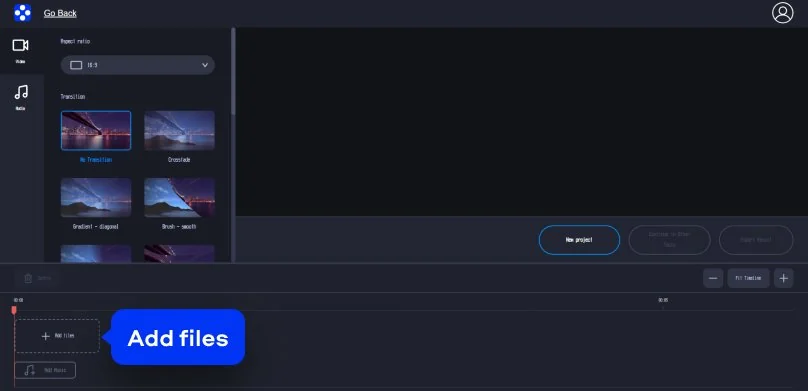
Step 1. Add your media files

Simply click Add files to upload the footage. The first MP4 clip appears right on the timeline. You can keep adding more files until everything needed for the story is in place.

Step 2. Arrange and edit

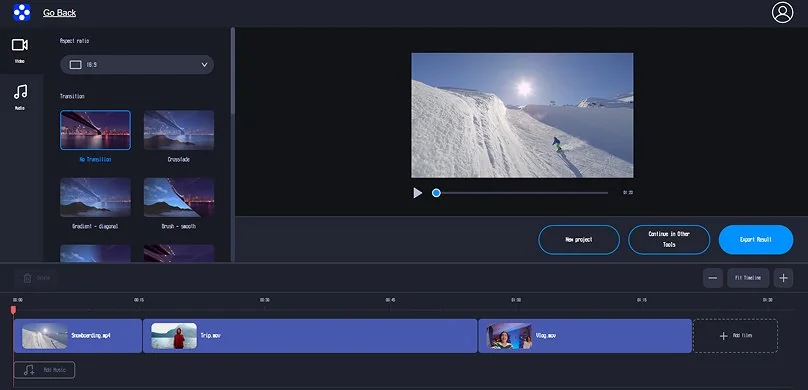
Drag and drop two videos to the timeline and arrange them side by side or one after the other. A crossfade can help the cut feel less sharp.

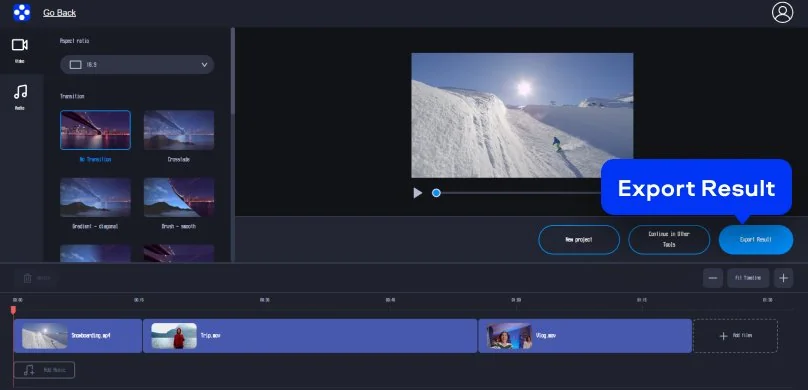
Step 3. Export your finished movie

Check the preview. If everything looks great, hit Export Result. The video merger quickly processes the project and saves your new video to the device.

Movavi Video Editor
Create awesome videos easily

*The free version of Movavi Video Editor may have the following restrictions depending on the build: watermark on exported clips, 60-second video or 1/2 audio length limit, and/or some advanced features unavailable when exporting videos.

Movavi Video Editor

Why choose Movavi

We’re the #1 choice for millions of people from all around the world. Join our thriving community and create stunning content with incredible ease.

70M+

users

190+

countries

15+

updates per year

10,000+

effects to choose from

Frequently asked questions

What video formats can I use with the video joiner?

The video joiner works with most common video formats, such as MP4, MOV, AVI, along with other file types people use on phones, laptops, and smart TVs.

Is it possible to merge videos of different formats for free?

Yes! You can quickly combine videos from different file types in the free online tool. The video editor smoothes everything out in the background. After export, the result plays as a single clip in the selected format.

Will I lose quality when I merge video online?

Not always. Quality usually drops because of heavy compression, low export settings, or output settings that do not match the original files. Keep the resolution and other export settings close to the original files, and the final video should remain close to the source clips.

How do I join MP4 files together quickly?

MP4 is common and easy to handle for most programs. Upload the files to the online video merger, arrange them, and save the result. It works well for YouTube or for sharing with friends.

Can I use Movavi Online Video Editor on iPhone and Android smartphones?

Yes, Movavi Online Video Editor can be used on iPhone and Android smartphones, completely free of charge.

Is Movavi Online Video Editor completely free?

Yes, Movavi Online Video Editor is a completely free video editing tool.

Does Movavi Online Video Editor add a watermark on videos?

No, you can export your files without a watermark completely free of charge.

Movavi Video Editor
Create awesome videos easily

*The free version of Movavi Video Editor may have the following restrictions depending on the build: watermark on exported clips, 60-second video or 1/2 audio length limit, and/or some advanced features unavailable when exporting videos.

Movavi Video Editor
Join us for discounts, editing tips, and content ideas

1.5M+ users already subscribed to our newsletter

By signing up, I agree to receive marketing emails from Movavi and agree to Movavi's Privacy Policy.