Movavi Video Editor

The tool lets you play video backwards for the creation of repeated visual sequences or sudden visual disclosures. It changes standard footage into a result that displays artistic skill.

By clicking the download button, you're downloading a free version of the program.*

Reverse Video Online for Free 

How to use our online video reverser

As a web-based utility, this video reverser functions within a browser. It can reverse video online without requiring software that’s more difficult to understand. For users who lack experience, the design helps with rapid editing of MP4 files to produce a clear output. It also makes creating viral content intended for wide distribution on YouTube, TikTok, or Instagram Reels much easier.

To begin the process, use those instructions:
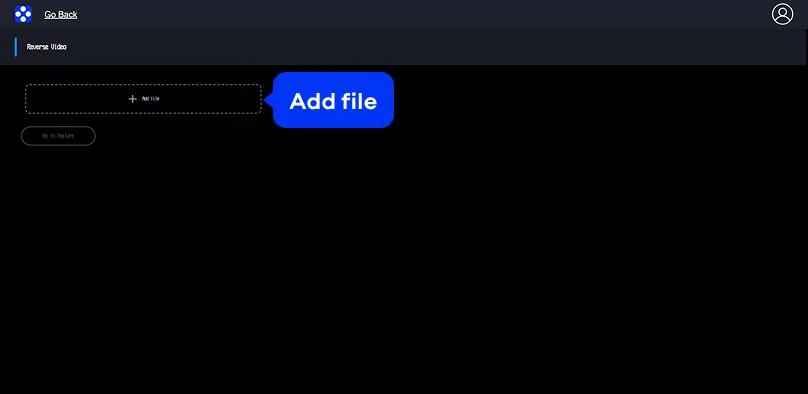
Step 1. Upload your clip

On the top banner, click the Add file button. When the window appears, you choose a file from your device that requires a change. As you select the file, the transfer begins.

Step 2. Let the reverser do the work

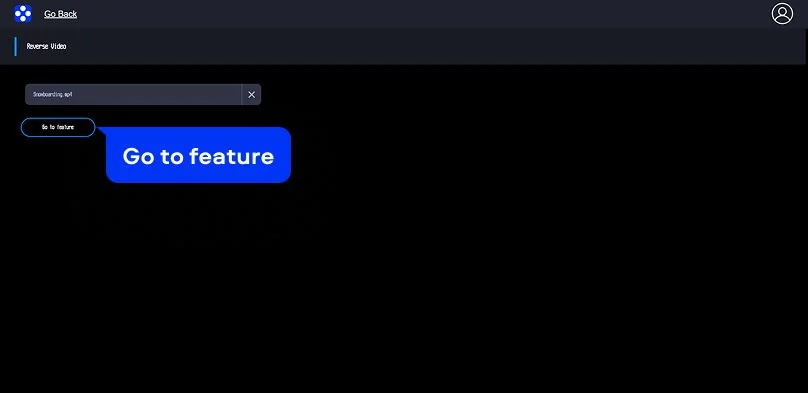
When the file is prepared, click Go to feature. Because the online video reverser functions without manual input, you avoid menus that are difficult to navigate. If you wish to see the reversed motion, you can watch a preview.

Step 3. Save and share

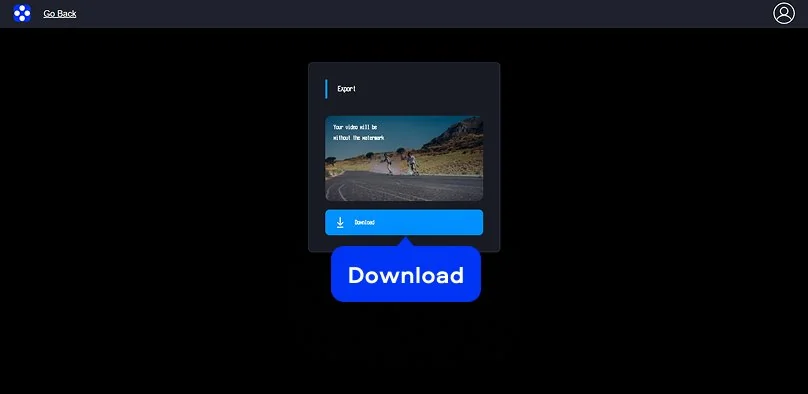
To store the file on your hardware, click Download – by doing this, you can play video backwards at any time. Due to the export process, the video maintains a high level of visual detail. There are no translucent logos on the final file. With this result the video is ready for immediate public viewing.

Movavi Video Editor
Create awesome videos easily

*The free version of Movavi Video Editor may have the following restrictions depending on the build: watermark on exported clips, 60-second video or 1/2 audio length limit, and/or some advanced features unavailable when exporting videos.

Movavi Video Editor

Why choose Movavi

We’re the #1 choice for millions of people from all around the world. Join our thriving community and create stunning content with incredible ease.

70M+

users

190+

countries

15+

updates per year

10,000+

effects to choose from

Frequently asked questions

How can I reverse a video online for free?

Use free online video reverser directly in the browser. The tool allows you to upload, edit, and preview your reversed clips instantly without installing any heavy apps. It’s the easiest way to handle quick edits on the go!

Will my video have a watermark?

This online video reverser produces files free of watermarks The finished video can then be used for a social media post, a school project, or any other task.

Is it safe to upload my content here?

As the system processes files, a secure connection is active - when the user uploads content, the server stores it for a short duration. By the time 24 hours pass, the system deletes the data.

Can I use the tool on my phone or Mac?

The video reverser anywhere there is a browser, so it can be used on iPhone, Android, Mac, and Windows. No installation is needed. In some cases, sign-in may be required before export.

Can I use Movavi Online Video Editor on Android and iPhone?

Yes – it works on both Android and iPhone, and it’s free to use.

Is Movavi Online Video Editor completely free?

Yes. All features are available for free – no payment required.

Does Movavi Online Video Editor add a watermark when exporting videos?

No. You can export videos without a watermark.

Movavi Video Editor
Create awesome videos easily

*The free version of Movavi Video Editor may have the following restrictions depending on the build: watermark on exported clips, 60-second video or 1/2 audio length limit, and/or some advanced features unavailable when exporting videos.

Movavi Video Editor
Have questions?
Have questions?
If you can’t find the answer to your question, please feel free to contact our Support Team.
Join us for discounts, editing tips, and content ideas

1.5M+ users already subscribed to our newsletter

By signing up, I agree to receive marketing emails from Movavi and agree to Movavi's Privacy Policy.